Baby’s first year collage app
Ink has a free baby’s first year template for iPhone and Android with 12 numbered photo spots, one per month, plus the name and dates; it saves with no watermark. The 12-photo grids without text, 31 of them, come with Ink Premium.
The template is a 1080×1350 portrait page: the name, the dates the year spans and three rows of four photos numbered 1 to 12. The name, the dates and the numbers are text you can change.
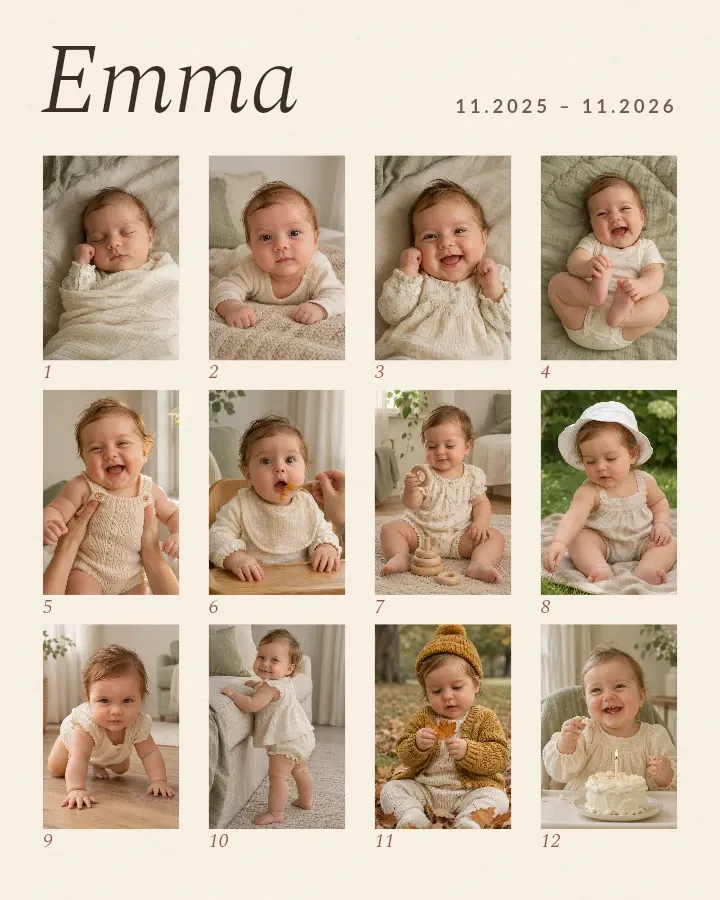
Fill it month by month
- Get Ink and open the baby’s first year template.
- Tap the photo in this month’s spot, tap Replace and pick your photo.
- Tap the name and the dates to type your own.
- Save the image when you want to share it. The collage stays in Projects for next month’s photo.
Until all twelve are yours, the other spots still show the sample baby. Shoot each month in the same place, on the same blanket or chair, so the change is what stands out.
Baby’s first year: templates and layouts
Baby’s first year layouts

Questions and answers
Can I start before the first birthday?
Yes. Replace the months you have; the collage stays in Projects, and you replace the next sample photo when the month comes.
Is the baby’s first year template free?
Yes. It is a free template and saves with no watermark. Ink Premium adds the other templates and the 12-photo grids.
Can I change the numbers to weeks or years?
Yes. The numbers are text, so you can type weeks, ages or years instead.
Get Ink on your phone
Scan to get Ink on your phone
Point your phone’s camera at the code. It opens the App Store on an iPhone and Google Play on Android.