Christmas card app for your own photos
Ink makes a free digital Christmas card on iPhone and Android: put your photos in a card template, add your greeting and send it on WhatsApp or by text. The Christmas photo card with one large family photo and a round snapshot is free; the three-photo card, the Story-size card and the New Year card come with Ink Premium.
Ink works as a Christmas card maker for the photos already on your phone: they go into the card in a few taps, every word on it is text you can retype, and the image saves with no watermark, no ads and no account.

Make the card and send it
- Open the Christmas photo card template in Ink. Tap the large photo, tap Replace and pick your family photo.
- Tap the round photo and replace it the same way, with a close-up of the kids, the baby or the dog.
- Tap Merry Christmas to type your own greeting, and the line below it for your names and the year.
- Tap the download button (Export), then Share image and pick WhatsApp, Messages, Mail or the app your family uses. Save image puts a copy in your photos.
Sending it to a group? It arrives as a photo, so everyone sees the card right in the chat, with no link to open.
More templates and layouts that make a card
- Christmas card with three family photos: a large photo on the left and two stacked beside it, on dark green above Merry Christmas and your names.
- From your own photos: tap Pick photos and choose three to six, and Ink opens on layouts for that many with your photos in place. Tap ✓ and add the greeting with Text. The layout with a large photo on the left has the shape of the three-photo card.
- Other Christmas templates: the Advent wreath, the December photo diary, Christmas Eve in six photos or a tree made of ten. There are more among the Christmas photo collage ideas.
What to write on a photo Christmas card
- From the whole family: Merry Christmas from all four of us, or Love from the Millers, with the year underneath.
- A holiday card for a mixed list: Happy Holidays, Season’s Greetings or Warm wishes for the holidays, for friends and colleagues who don’t all celebrate Christmas.
- Big news: Our first Christmas as three, or Merry Christmas from our new home. Put the news in the large photo.
- A line of faith: Peace on earth, or Wishing you the joy of Christmas.
- Christmas and New Year in one: Merry Christmas and a happy New Year, when this is the only card you send.
Which size to send
- Portrait (4:5, 1080×1350) for the family chat, a text or a feed post: it shows large on a phone. The Christmas photo card is this size, and every layout opens in it.
- Story (9:16, 1080×1920) for a WhatsApp Status or an Instagram Story. The Christmas card in Story size puts three snowy photos under Merry Christmas; or pick your photos and tap 9:16, and the layouts change to Story shape.
- Square (1:1, 1080×1080) for a feed post or a square print: tap 1:1 on the layouts. The December photo diary is square.
A New Year card with your photos
The New Year card template puts three family photos above Happy New Year, the new year in gold and your family name, on midnight blue. Send it on New Year’s Eve or New Year’s Day with Share image.
Or turn your Christmas card into one: in the last week of December, open it from Projects, tap Merry Christmas and type Happy New Year, and swap one photo for a picture from the holidays. To keep the Christmas version as well, save it with Save image before you change it.
Printing it yourself
Ink doesn’t print or mail cards: save the card with Save image and print it like any photo, at home or at a photo printing service. It is a PNG of 1080×1350 pixels, made for a phone screen, so it prints sharp up to about postcard size (4 × 5 inches, 10 × 13 cm) and gets softer the larger you go.
A standard 4 × 6 photo print is a different shape (2:3). Choose the option that fits the whole image on the paper, with a white border, or the edges of the card get cut off.
Layouts and templates for this
-
 Christmas card with three family photos
-
 Christmas card in Story size with three snowy photos
-
 Happy New Year card with three family photos
-
 Christmas Eve family photo collage with six photos
-
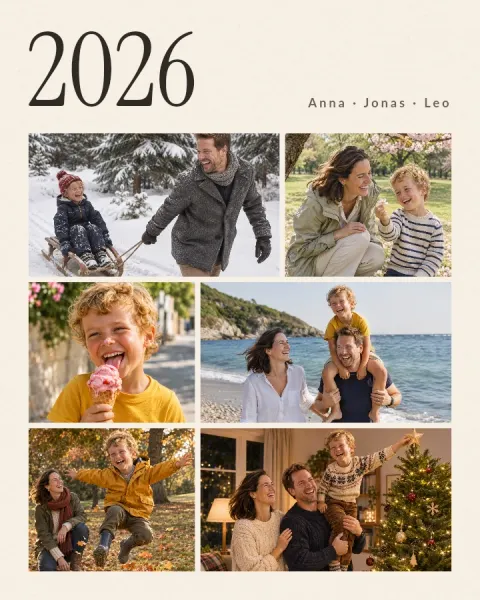 Family year in review photo collage




Questions and answers
Is the Christmas card free to make?
Yes. The Christmas photo card template, with one large family photo and a round snapshot, is free, and so are saving and sharing the card. The three-photo Christmas card, the Story-size card and the New Year card are part of Ink Premium.
Does the card have a watermark?
No. Ink saves every image without a watermark, shows no ads and never asks you to sign up.
Does it work on Android?
Yes. Ink runs on Android 6.0 or later and on iPhone with iOS 15.0 or later, with the same templates and layouts. Share image opens your phone’s share menu, with WhatsApp, Messages, Gmail or whatever else you have installed.
Can I change Merry Christmas to my own words?
Yes. Every word in the templates is text: tap Merry Christmas and type Happy Holidays, Season’s Greetings or Frohe Weihnachten, then tap the line below it for your names and the year.
How do I send the card on WhatsApp?
Tap the download button (Export), then Share image, choose WhatsApp and pick the chat or group. For your WhatsApp Status, use the Christmas card in Story size (9:16).
Can I make a New Year card too?
Yes. The New Year card template has three family photos above Happy New Year and the year. Or open your Christmas card from Projects and retype the greeting.
Can I print the card?
Yes. Save it with Save image and print it like any photo. At 1080×1350 pixels it stays sharp up to about postcard size. Ink itself doesn’t print or mail cards.
Can I make the Christmas card online, on a computer?
Yes, in the browser, with Ink’s online collage maker: layouts for 2 to 6 photos, a title in the font and color you choose, and a PNG download with no watermark and no sign-up. The Christmas card templates are only in the app.
Get Ink on your phone
Scan to get Ink on your phone
Point your phone’s camera at the code. It opens the App Store on an iPhone and Google Play on Android.