Make a vision board on your phone
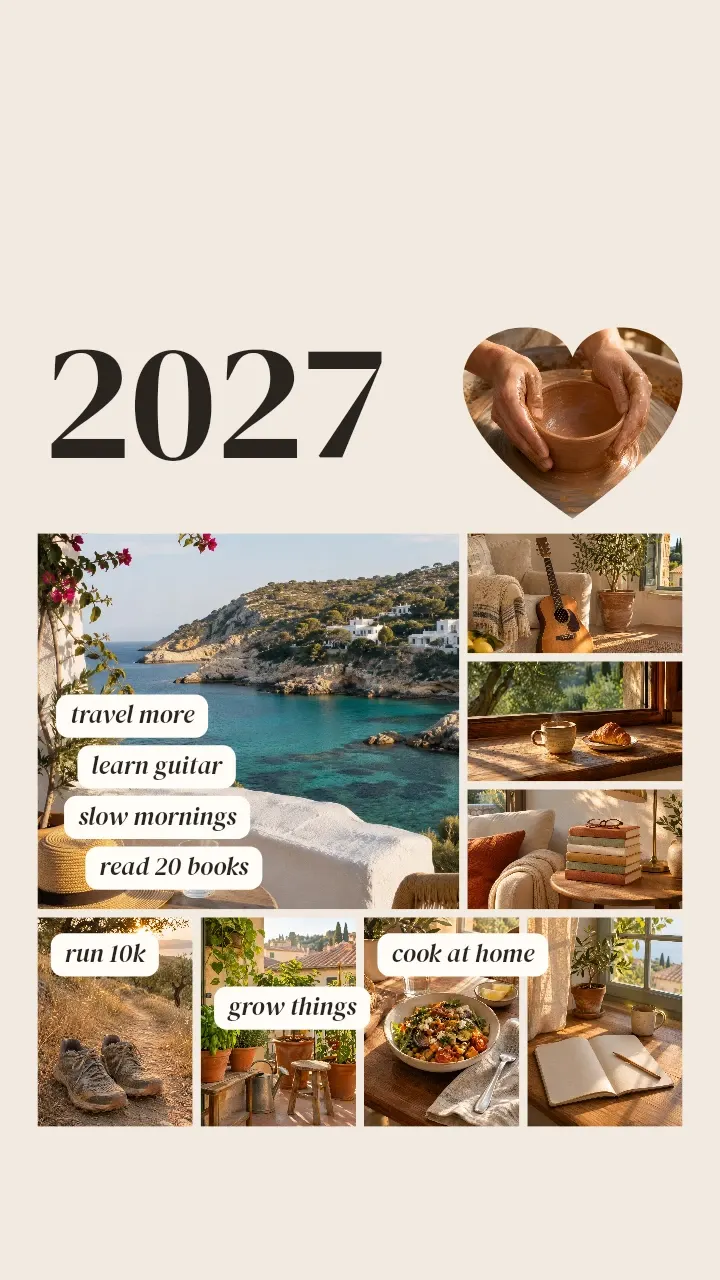
Ink makes a vision board on iPhone and Android from your own photos and words: a free 2027 template at phone wallpaper size has nine photos and seven goals. A board of your own with 9 to 20 photos needs Ink Premium.
Replace the sample photos with yours, retype the goals and set the board as your lock screen: the top stays clear for the clock, and you see your goals every time you pick up your phone.
How to make a vision board on your phone
- Get Ink and open the Vision board 2027 template.
- Tap a photo, tap Replace and pick a picture of one of your goals: your own photo, or a picture saved on your phone. Do the same for the other eight, the heart too.
- Tap each goal and type your own. The 2027 is text as well.
- Tap the download button (Export), then Save image, and set the image as your wallpaper.
The board stays in Projects: when a goal changes, open it, swap a photo or a word and save it again.
Or start from your own photos
- Tap Pick photos and choose six to eight pictures for your goals. Ink opens on layouts for that many, with your pictures in place.
- Tap 9:16 for story size (1080×1920), the shape of a phone wallpaper, or keep 4:5 (portrait, 1080×1350) for a print. Pick a layout and tap ✓.
- Add the year and your goals with Text. For a heart-shaped photo like the template’s, tap Photo, pick it, then tap Frame and choose the heart.
- Tap the download button (Export), then Save image.
Vision board ideas: what to put on it
- Travel: the place you want to see, from a trip photo or a picture you saved: a coast road, a city at night, a cabin in the snow. One word is enough, such as “Japan”.
- Health and fitness: your running shoes, last year’s race bib, your bike, with “Run a half marathon” or “Swim twice a week”.
- Home: the wall you want to paint, tomatoes on the balcony, the keys to a place of your own. “Our own place” says it.
- Money and work: the course you’re starting, your desk, a savings jar; “Pay off the card”, “Open the shop”.
- Family and friends: you with your grandmother, friends around a table, next to “Call Gran on Sundays” or “Dinner with friends every month”.
- Learning and hobbies: a guitar, a sketchbook, your Spanish notes. Goals you can count work best: “Learn ten songs”, “Read 12 books”.
- Calm: coffee by the window, a path in the woods and a rule like “Phone off at 10”.
Set it as your lock screen
The template is already in story size (9:16, 1080×1920); for a layout of your own, tap 9:16. On iPhone, open the image in Photos, tap the share button, then Use as Wallpaper; Set as Wallpaper Pair puts it on both the lock screen and the home screen. On Android, open it in Gallery or Google Photos and choose Set as wallpaper from the menu (the name varies by phone), then the lock screen, the home screen or both.
The lock screen shows the board best; on the home screen, app icons cover most of it. The clock sits at the top of the lock screen and the camera and flashlight buttons at the bottom. The template keeps the top clear for the clock; on a board of your own, keep the words in the middle and put a photo that can lose a strip, such as sky or sea, at the top. Most phones are a little taller than 9:16 and trim the sides, so keep words off the edges too.
Vision board bingo card
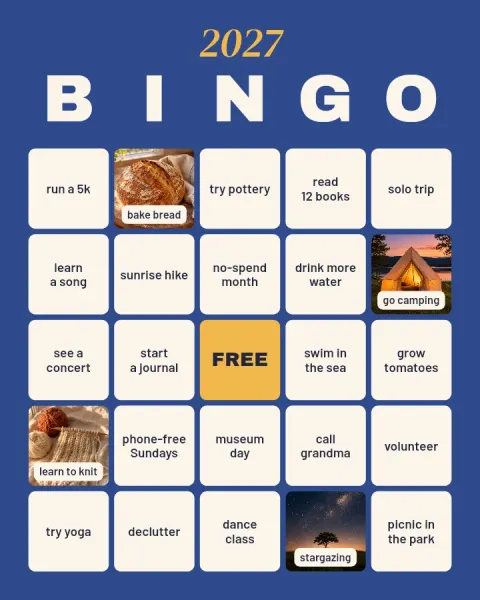
The vision board bingo card spreads 24 small goals for 2027 over a 5×5 grid around a FREE square, from “run a 5k” to “call grandma” and “picnic in the park”; four squares are photos. Retype the goals, swap in your photos, and print or post it: the card is portrait (4:5, 1080×1350). It stays in Projects, so you can open it during the year and change a square once a goal is done.
Layouts and templates for this




Questions and answers
Is Ink a free vision board app?
Yes. The vision board template and the bingo card are free, and so are the layouts for up to 8 photos, text, the free fonts, the heart, star and circle frames and saving, with no watermark, no ads and no account. Layouts for 9 to 20 photos, every font and every frame come with Ink Premium.
Is there a vision board template?
Yes. Vision board 2027 is at phone wallpaper size, with nine photos (one shaped as a heart), a big 2027 and seven goals to retype. There is also a vision board bingo card with 24 goals, and the app has another vision board among its templates.
How many pictures should a vision board have?
Six to twelve suits a phone: one or two per goal, each big enough to recognize on the lock screen. The template has nine; one layout holds up to 20 photos, which suits a printed board better than a phone.
What size is a vision board for the lock screen?
Story size: 9:16, 1080×1920 pixels, the shape of a phone screen. The vision board template is already that size; for a layout of your own, tap 9:16 when you choose it, or later tap Resize and choose Story / Reel.
Can I print my vision board?
Yes. Save it and print it at home or at a photo shop; Ink has no print service. The bingo card and the portrait size (4:5, 1080×1350) suit a print best: they print sharp at about postcard size.
Can I change my vision board during the year?
Yes. It stays in Projects: open it, replace a photo or change a word when a goal changes, then save it and set it as your wallpaper again.
Can I make a vision board on a laptop?
Yes, a simpler one: the online collage maker runs in the browser with layouts for 2 to 6 photos and a title, and downloads a PNG with no sign-up. The templates, frames and more photos are in the app.
Sources
Get Ink on your phone
Scan to get Ink on your phone
Point your phone’s camera at the code. It opens the App Store on an iPhone and Google Play on Android.